
XSL-FO
Lesgeld
Cursus XSL-FO Intro
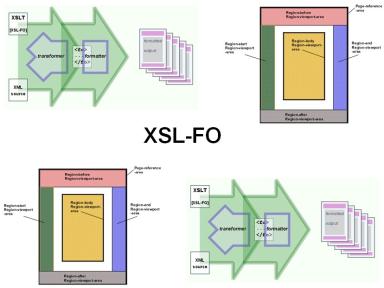
In de cursus XSL-FO leren deelnemers over de belangrijke rol van XSLT bij het aanmaken van XSL-FO documenten. Daarnaast wordt de functie van XSL-FO processors besproken, die in staat zijn om verschillende outputformaten, zoals PDF, te genereren. Deze cursus biedt een uitgebreide basis voor iedereen die met XSL-FO wil werken en is essentieel voor het creëren van professioneel ogende documenten.
Page Masters
Tijdens de cursus XSL-FO besteden we aanda
Cursus XSL-FO Intro
In de cursus XSL-FO leren deelnemers over de belangrijke rol van XSLT bij het aanmaken van XSL-FO documenten. Daarnaast wordt de functie van XSL-FO processors besproken, die in staat zijn om verschillende outputformaten, zoals PDF, te genereren. Deze cursus biedt een uitgebreide basis voor iedereen die met XSL-FO wil werken en is essentieel voor het creëren van professioneel ogende documenten.
Page Masters
Tijdens de cursus XSL-FO besteden we aandacht aan de layout master set en de verschillende page masters die gekozen kunnen worden. Dit zijn cruciale elementen voor het ontwerpen van layouts die voldoen aan specifieke eisen en standaarden.
Page Flow en Static Content
Ook het verschil tussen statische content en page flow content komt aan bod in deze cursus XSL-FO. Het begrijpen van deze concepten is essentieel voor het effectief gebruik van XSL-FO bij documentcreatie.
XSL-FO Elements en Attributes
In de cursus behandelen we het gebruik van vele elementen en attributen van de XSL-FO taal in detail. De deelnemers krijgen de kans om zowel open source tools als XMLSpy te gebruiken voor de uitvoering van opdrachten. Dit zorgt ervoor dat ze praktische ervaringen opdoen die direct toepasbaar zijn in hun werk.
Voor meer informatie over de XSL-FO specificaties, kun je de officiële documentatie bekijken op W3C XSL-FO. Voor aanvullende kennis is het ook aan te raden om de cursus XML Introductie te volgen.
Doelgroep Cursus XSL-FO
De cursus XSL-FO is bedoeld voor developers die de opmaak van XML en de layout van documenten met XSL-FO willen leren.
Voorkennis Cursus XSL-FO
Om aan deze cursus deel te kunnen nemen is basis kennis van XML en HTML vereist. Ervaring met programmeren is bevordelijk voor een goede begripsvorming.
Uitvoering Training XSL-FO
De onderwerpen worden besproken aan de hand van presentation slides. Demo's worden gebruikt om de behandelde concepten te verduidelijken. De theorie wordt afgewisseld met oefeningen. De cursustijden zijn van 9.30 tot 16.30.
Certificering XSL-FO
De deelnemers krijgen na het goed doorlopen van de cursus een officieel certificaat XSL-FO.
Modules
Module 1 : XSL-FO Intro
- An XSL-Overview
- XPath, XSLT and XSL-FO
- The XSL-FO Processor
- Output Formats
- PDF, Postscript, RTF
- Short Form and Inheritance
- Structure of XSL-FO Document
- Flow Objects
- Layout Objects
- Auxiliary Objects
- Flows and Flow Mapping
- Formatting Object Content
Module 2 : Blocks and Inlines
- Blocks and Inlines
- Formatting Blocks
- Box Model
- Border
- Space, Indent and Padding
- Background
- Formatting Text
- Inline Elements
- Inheritance wrapper
- Creating Lists
- list-block
- item, label and body
Module 3 : Page Layout
- About Pagination
- Simple Pagination
- Complex Pagination
- Working with Page Sequences
- Working with Areas
- Area Types
- Area Components
- Area Positioning
- Block and Inline Elements
- Tables and Lists
- Working with Graphics and Color
- Character Properties and Fonts
Module 4 : Page Flow
- Page Sequence Masters
- Page Masters
- Viewport Area
- Cross Document Links
- Creating and Index
- Creating Table of Contents
- Working with Headers
- Page Layout and Flow
- Region Mapping
- Stylesheet Considerations
Module 5 : Additional Content
- Links and Graphics
- External Links
- Internal Links
- Leaders, Markers and Page Numbers
- The Output
- Leaders
- Columns, Keeps, and Breaks
- Columns
- Keeps
- Breaks
